EUDI wallets with OpenID4VP in action (2/2): on another device
The European Digital Identity wallet is coming, and applications accepting it will need to talk to it. This is the second of two posts showing how to do that with pac4j: in the first post the wallet ran on the same phone as the browser; here the browser is on a computer, the wallet on a phone, and a QR code bridges the two.
1) Why prepare for EUDI wallets?
Regulation (EU) 2024/1183, better known as eIDAS 2.0, entered into force on May 20, 2024. EU member states must offer EUDI wallets by the end of 2026, holding person identification data (PID) and attestations such as driving licences or diplomas. Using a wallet remains voluntary.
Article 5f also requires acceptance by public services requiring electronic identification, certain private services requiring strong authentication, and very large online platforms requiring authentication. Private-sector obligations have conditions and exemptions, including for microenterprises and small enterprises, with a deadline tied to implementing acts, generally described as late 2027.
For applications in scope, wallet authentication is becoming an integration requirement worth preparing for.
2) Why it is hard
A wallet login looks simple: the user opens their wallet, sees what your application asks for, consents, and the wallet sends a signed proof. Behind this, the stack is anything but simple. Your application, the verifier in the vocabulary of the specifications, has to deal with:
- OpenID for Verifiable Presentations 1.0, the protocol itself: how the wallet is invoked, how it fetches the request, how it posts the response, with its Digital Credentials Query Language (DCQL) to say what you want
- the High Assurance Interoperability Profile (HAIP), which pins the options the EUDI wallet uses, and the Architecture and Reference Framework (ARF) of the European Commission, with its PID rulebook
- two credential formats: the SD-JWT VC of the IETF, built on selective disclosure JWTs, and the mobile documents (mdoc) of ISO/IEC 18013-5, encoded in CBOR and signed with COSE
- the plumbing underneath: signed request objects (RFC 9101), JWS, JWE and JWK, X.509 certificate chains and revocation, decentralized identifiers, and the Digital Credentials API of the browsers for the newest flows.
And several ways to identify the verifier, several ways to reach the wallet, several response modes, each with its own validation rules. Implementing this by hand, and keeping it right as the specifications move, is a project in itself.
3) pac4j to the rescue
pac4j has one security model for every protocol: a Client starts the authentication, a callback receives the answer, a UserProfile ends up in the session. CAS, SAML, OpenID Connect, OAuth all fit in it, and a digital wallet does too.
The new pac4j-openid4vp module, which arrives with pac4j v6.6.0, adds the EudiWalletClient: you give it a DCQL query, a keystore and the issuers you trust, and it handles the signed request, the encrypted response, credential verification and the user profile. If you have already used pac4j, the integration will look familiar.
The first post walked through a same-device flow with an SD-JWT VC PID. This one takes the wallet to another device: the user is on a computer, the page shows a QR code, the phone scans it, and an mdoc PID comes back, the format of ISO/IEC 18013-5, the one of the mobile driving licences.
4) A young protocol: test with demo wallets
OpenID4VP 1.0 was finalized in 2025, and wallet implementations are still evolving. Demo wallets let you test the integration while preparing for national EUDI deployments; expect differences between wallets and versions.
A very good one is the Paradym wallet by Animo, available for Android and iOS, and its playground which plays both the issuer and the verifier:
- install the Paradym wallet on your phone
- open playground.paradym.id on your computer and, on the Issuance page, choose PID mDoc, the card this post uses: the page shows a QR code, scan it with the Paradym wallet, accept the offer, and the card appears in the wallet
- keep the Trust Information page of the playground at hand: it shows the certificate of the playground issuer, which your application must trust.
The cards are Emma Charlotte van der Berg’s, a fictitious Dutch citizen, and the mdoc PID carries, among other attributes, a personal_administrative_number: a stable identifier, which the profile below relies on.
Issue the card from this playground and no other: a PID issued elsewhere, by the older playground.animo.id for instance, is signed by another certificate and the truststore of section 7 refuses it. If the wallet already holds PID cards from another source, delete them, or at least pick the right one when the wallet asks which card to present.
5) ngrok: a real URL for the wallet
The wallet talks to your application over HTTPS, from the phone: it fetches the request object and posts its response. The phone is not on your computer, so localhost will not do.
The simplest way during development is ngrok, which exposes your local port on a public HTTPS address:
ngrok http 8080
It prints a public URL such as https://abcd-1234.ngrok-free.dev: this is the base URL of your application for the rest of this post. The free plan includes a development domain assigned to your account. Copy the URL ngrok prints into the property below. If the browser shows an ngrok warning page, choose Visit Site to continue.
6) Create the Spring Boot project
This is a plain Spring Boot web application, with spring-webmvc-pac4j as the pac4j implementation. Java 17 or later and Maven are enough.
mkdir -p wallet-another-device/src/main/java/org/pac4j/demo/wallet
mkdir -p wallet-another-device/src/main/resources wallet-another-device/metadata
cd wallet-another-device
The pom.xml. The mdoc verification relies on the walt.id library, which pac4j declares as optional and which walt.id publishes on its own repository:
<project xmlns="http://maven.apache.org/POM/4.0.0"
         xmlns:xsi="http://www.w3.org/2001/XMLSchema-instance"
         xsi:schemaLocation="http://maven.apache.org/POM/4.0.0 https://maven.apache.org/xsd/maven-4.0.0.xsd">
    <modelVersion>4.0.0</modelVersion>
    <parent>
        <groupId>org.springframework.boot</groupId>
        <artifactId>spring-boot-starter-parent</artifactId>
        <version>4.0.4</version>
        <relativePath/>
    </parent>
    <groupId>org.pac4j.demo</groupId>
    <artifactId>wallet-another-device</artifactId>
    <version>1.0-SNAPSHOT</version>

    <properties>
        <java.version>17</java.version>
        <kotlin.version>2.4.20</kotlin.version>
    </properties>

    <!-- walt.id publishes the mdoc library outside Maven Central -->
    <repositories>
        <repository>
            <id>waltid-releases</id>
            <url>https://maven.waltid.dev/releases</url>
            <snapshots><enabled>false</enabled></snapshots>
        </repository>
    </repositories>

    <dependencyManagement>
        <dependencies>
            <!-- keep the datetime API used by walt.id 0.12.0 -->
            <dependency>
                <groupId>org.jetbrains.kotlinx</groupId>
                <artifactId>kotlinx-datetime-jvm</artifactId>
                <version>0.6.1</version>
            </dependency>
        </dependencies>
    </dependencyManagement>

    <dependencies>
        <dependency>
            <groupId>org.springframework.boot</groupId>
            <artifactId>spring-boot-starter-web</artifactId>
        </dependency>
        <!-- the pac4j implementation for Spring MVC -->
        <dependency>
            <groupId>org.pac4j</groupId>
            <artifactId>spring-webmvc-pac4j</artifactId>
            <version>8.0.3</version>
        </dependency>
        <!-- the OpenID4VP support: the application is a verifier -->
        <dependency>
            <groupId>org.pac4j</groupId>
            <artifactId>pac4j-openid4vp</artifactId>
            <version>6.6.0</version>
        </dependency>
        <!-- the mdoc verification, an optional library of pac4j -->
        <dependency>
            <groupId>id.walt.mdoc-credentials</groupId>
            <artifactId>waltid-mdoc-credentials-jvm</artifactId>
            <version>0.12.0</version>
        </dependency>
    </dependencies>

    <build>
        <plugins>
            <plugin>
                <groupId>org.springframework.boot</groupId>
                <artifactId>spring-boot-maven-plugin</artifactId>
            </plugin>
        </plugins>
    </build>
</project>
The walt.id library is written in Kotlin. pac4j manages Kotlin versions for its own build; applications must align their runtime dependencies too. This POM pins Kotlin to 2.4.20 and kotlinx-datetime-jvm to 0.6.1; Spring Boot 4.0.4 already manages the matching coroutines (1.10.2) and serialization (1.9.0) versions. See Kotlin alignment, especially if you also verify SD-JWT VC credentials. Do not upgrade kotlinx-datetime to 0.7.x, which removes APIs used by walt.id 0.12.0.
The src/main/resources/application.properties file holds the base URL and enables the logs we will read at the end:
app.base-url=https://abcd-1234.ngrok-free.dev
logging.level.org.pac4j.openid4vp=DEBUG
logging.level.PROTOCOL_MESSAGE.OPENID4VP=DEBUG
And the usual Spring Boot entry point:
package org.pac4j.demo.wallet;

import org.springframework.boot.SpringApplication;
import org.springframework.boot.autoconfigure.SpringBootApplication;

@SpringBootApplication
public class WalletApplication {

    public static void main(final String[] args) {
        SpringApplication.run(WalletApplication.class, args);
    }
}
7) Keys and trust
Two keystores go in the metadata directory, the same as in the first post. Run the keytool commands below from the root of the project, next to the pom.xml: the paths are relative to it, like the ones in the configuration.
The verifier key. EudiWalletClient signs requests and identifies the verifier by its certificate hash (x509_hash). Production EUDI deployments use a relying party access certificate issued by the ecosystem. This demo uses a self-signed certificate with an EC P-256 key, accepted by the tested Paradym wallet; self-signed verifier certificates are outside the HAIP requirements:
keytool -genkeypair -alias rp -keyalg EC -groupname secp256r1 -sigalg SHA256withECDSA \
  -dname "CN=pac4j demo verifier,O=pac4j" -validity 365 \
  -keystore metadata/verifier.p12 -storetype PKCS12 -storepass changeit
The issuers you trust. No credential is accepted unless its issuer is trusted, and pac4j trusts nobody by default. For an mdoc, the trust anchor is the issuing authority certificate authority (IACA) of the PID provider. Copy the Issuer Certificate from the Trust Information page of the playground into a paradym-issuer.pem file, and import it into a truststore:
keytool -importcert -alias paradym -file paradym-issuer.pem -noprompt \
  -keystore metadata/pid-issuers.p12 -storetype PKCS12 -storepass changeit
8) Configure pac4j
The configuration is a Pac4jSecurityConfig of spring-webmvc-pac4j: the Config bean defines the client, and the interceptors say which URLs it protects.
package org.pac4j.demo.wallet;

import org.pac4j.core.config.Config;
import org.pac4j.core.config.properties.KeystoreProperties;
import org.pac4j.openid4vp.client.EudiWalletClient;
import org.pac4j.openid4vp.config.OpenId4VpConfiguration;
import org.pac4j.openid4vp.dcql.EudiPidQuery;
import org.pac4j.openid4vp.verifier.MdocVerifier;
import org.pac4j.openid4vp.verifier.trust.CertificateTrustedIssuer;
import org.pac4j.springframework.config.Pac4jSecurityConfig;
import org.slf4j.Logger;
import org.slf4j.LoggerFactory;
import org.springframework.beans.factory.annotation.Value;
import org.springframework.context.annotation.Bean;
import org.springframework.context.annotation.Configuration;
import org.springframework.web.servlet.config.annotation.InterceptorRegistry;

import java.util.Map;

import static org.pac4j.core.profile.definition.CommonProfileDefinition.FAMILY_NAME;
import static org.pac4j.openid4vp.profile.EudiPidProfileDefinition.GIVEN_NAME;
import static org.pac4j.openid4vp.profile.EudiPidProfileDefinition.PERSONAL_ADMINISTRATIVE_NUMBER;
import static org.pac4j.openid4vp.profile.EudiPidProfileDefinition.PID_DOCTYPE;

@Configuration
public class SecurityConfig extends Pac4jSecurityConfig {

    private static final Logger LOGGER = LoggerFactory.getLogger(SecurityConfig.class);

    @Value("${app.base-url}")
    private String baseUrl;

    @Bean
    public Config config() {
        // the request: signed with the key of the verifier, asking for three attributes of the PID as an mdoc
        final var configuration = new OpenId4VpConfiguration()
            .setKeystore(new KeystoreProperties("./metadata/verifier.p12")
                .setKeyStoreType("PKCS12")
                .setKeyStoreAlias("rp")
                .setKeystorePassword("changeit")
                .setPrivateKeyPassword("changeit"))
            .setDcqlQuery(EudiPidQuery.mdoc(GIVEN_NAME, FAMILY_NAME, PERSONAL_ADMINISTRATIVE_NUMBER));

        // the response: an mdoc is accepted if its certificate chain ends in the truststore
        final var issuers = new CertificateTrustedIssuer(new KeystoreProperties("./metadata/pid-issuers.p12")
            .setKeyStoreType("PKCS12")
            .setKeystorePassword("changeit"));
        // certificate revocation checking is disabled to simplify this demo; keep it enabled in production
        issuers.setCertificateRevocationEnabled(false);
        // an mdoc may reference a status list: this demo logs the reference and accepts the document,
        // a real status checker must retrieve the list, verify it and check the entry of the document
        configuration.addCredentialVerifier(new MdocVerifier().addTrustedIssuer(issuers)
            .setStatusChecker((credential, status) -> LOGGER.info("document status not checked: {}", status)));

        // the profile identifier: the issuer and the administrative number, read in the namespace of the PID
        configuration.setProfileIdResolver(credentials -> {
            final var pid = credentials.getVerifiedCredentials().get(EudiPidQuery.PID).get(0);
            final var namespace = (Map<?, ?>) pid.getClaims().get(PID_DOCTYPE);
            return pid.getIssuer() + "|" + namespace.get(PERSONAL_ADMINISTRATIVE_NUMBER);
        });

        final var client = new EudiWalletClient(configuration);
        return new Config(baseUrl + "/callback", client);
    }

    @Override
    public void addInterceptors(final InterceptorRegistry registry) {
        addSecurity(registry, "EudiWalletClient").addPathPatterns("/protected/**");
    }
}
Compared to the first post, two things change:
- The verifier is
MdocVerifier, which checks the issuer authentication of the document, its digests, its validity, the signature of the device and the binding of the response to the request, and the chain of the document signer up to your truststore. - The claims of an mdoc are grouped by namespace: for the PID, the namespace is its document type,
eu.europa.ec.eudi.pid.1. The profile identifier reads the administrative number in that namespace, and the profile exposes an attribute named after the namespace, holding the three claims.ProfileIdResolver.issuerAndClaim(...)only reads the top-level claims of an SD-JWT VC, hence the small resolver above.
The rest is the same: EudiWalletClient pins the HAIP choices, x509_hash and direct_post.jwt, and the callback URL serves both the wallet and the browser.
These settings do not constitute complete HAIP conformance validation. An mdoc may carry a status object in its MSO, a reference to an OAuth Token Status List: the list where the issuer marks the documents it has revoked or suspended. pac4j refuses a document carrying a status unless a status checker is configured, because only the application can decide how to read the list, and it never fetches it on its own. The mdoc PID of the playground carries none today, unlike its SD-JWT VC PID, but the checker stays configured so that a document with a status is logged rather than refused: it receives the status object as a map, only logs it and accepts the document, so revocation is not checked here. A real checker retrieves the status list token, verifies its signature with the same trust as the document and checks the entry at the index of the document: that deserves a post of its own. See credential status. Disabling certificate revocation does not bypass this check.
9) The DCQL query
The query says what your application wants. EudiPidQuery.mdoc(GIVEN_NAME, FAMILY_NAME, PERSONAL_ADMINISTRATIVE_NUMBER) builds it in one line for the PID; this is what the wallet receives:
{
  "credentials": [
    {
      "id": "pid",
      "format": "mso_mdoc",
      "meta": { "doctype_value": "eu.europa.ec.eudi.pid.1" },
      "claims": [
        { "path": ["eu.europa.ec.eudi.pid.1", "given_name"] },
        { "path": ["eu.europa.ec.eudi.pid.1", "family_name"] },
        { "path": ["eu.europa.ec.eudi.pid.1", "personal_administrative_number"] }
      ]
    }
  ]
}
One credential query, identified as pid, for a mobile document whose type is the EUDI PID, and three data elements, each addressed by its namespace and its name. The same can be written by hand, in JSON when it comes from a configuration file:
configuration.setDcqlQuery("""
    {"credentials":[{"id":"pid","format":"mso_mdoc","meta":{"doctype_value":"eu.europa.ec.eudi.pid.1"},
     "claims":[{"path":["eu.europa.ec.eudi.pid.1","given_name"]},{"path":["eu.europa.ec.eudi.pid.1","family_name"]},
               {"path":["eu.europa.ec.eudi.pid.1","personal_administrative_number"]}]}]}""");
Or in Java, with access to expected values, alternatives (claim_sets, credential_sets) and trusted authorities:
configuration.setDcqlQuery(new DcqlQuery()
    .addCredential(new CredentialQuery("pid", CredentialFormat.MSO_MDOC)
        .setDoctypeValue("eu.europa.ec.eudi.pid.1")
        .addClaim("eu.europa.ec.eudi.pid.1", "given_name")
        .addClaim("eu.europa.ec.eudi.pid.1", "family_name")
        .addClaim("eu.europa.ec.eudi.pid.1", "personal_administrative_number")));
Whatever the wallet presents is checked against the query again by pac4j: the format, the document type, the namespaces and the elements. The constraints are not left to the wallet.
10) The pages, with the QR code
In this flow, the wallet is on the phone rather than the computer running the browser. The page gets the wallet URL as data and displays it as a QR code, then waits for the wallet’s response. Three pieces do that:
- the protected page itself, as before
- a
/statusendpoint, which reports the transaction state for the browser session:PENDING,RECEIVEDorEXPIRED, fromclient.getPresentationStatus(...).RECEIVEDincludes a wallet error response; the callback then reports that error - the page with the QR code and its script, which polls the
/statusendpoint every second until the wallet has answered.
The three live in a single Spring MVC controller, WalletController, to create next to the two previous classes:
package org.pac4j.demo.wallet;

import org.pac4j.core.config.Config;
import org.pac4j.core.context.CallContext;
import org.pac4j.core.context.WebContext;
import org.pac4j.core.context.session.SessionStore;
import org.pac4j.core.profile.ProfileManager;
import org.pac4j.openid4vp.client.OpenId4VpClient;
import org.springframework.beans.factory.annotation.Autowired;
import org.springframework.http.CacheControl;
import org.springframework.http.ResponseEntity;
import org.springframework.stereotype.Controller;
import org.springframework.web.util.HtmlUtils;
import org.springframework.web.bind.annotation.GetMapping;
import org.springframework.web.bind.annotation.ResponseBody;

import java.util.Locale;
import java.util.Map;

@Controller
public class WalletController {

    @Autowired
    private Config config;

    @Autowired
    private WebContext webContext;

    @Autowired
    private SessionStore sessionStore;

    @Autowired
    private ProfileManager profileManager;

    @GetMapping("/protected/index")
    @ResponseBody
    public String protectedPage() {
        return "<h1>Protected page</h1><p>" + HtmlUtils.htmlEscape(profileManager.getProfiles().toString()) + "</p>"
            + "<p><a href='/logout'>Logout</a></p>";
    }

    /** Whether the wallet answered the transaction of this browser session. */
    @GetMapping("/status")
    public ResponseEntity<Map<String, String>> status() {
        final var client = (OpenId4VpClient) config.getClients().findClient("EudiWalletClient").orElseThrow();
        final var status = client.getPresentationStatus(new CallContext(webContext, sessionStore));
        return ResponseEntity.ok().cacheControl(CacheControl.noStore())
            .body(Map.of("status", status.name().toLowerCase(Locale.ROOT)));
    }

    @GetMapping("/")
    @ResponseBody
    public String index() {
        return """
            <h1>Log in with your wallet</h1>
            <p>Scan the QR code with your phone's wallet. This page continues automatically when the wallet responds.</p>
            <div id="qr"></div>
            <pre id="log"></pre>
            <script src="https://cdn.jsdelivr.net/npm/[email protected]/dist/qrcode.js"></script>
            <script>
              const log = m => document.getElementById('log').textContent += m + '\\n';

              async function start() {
                // the same request a browser would make, but as an AJAX call: pac4j then answers 401,
                // with the wallet URL in the Location header, instead of redirecting the page
                const r = await fetch('/protected/index', {headers: {'X-Requested-With': 'XMLHttpRequest'}});
                if (r.ok) {
                  window.location.assign('/protected/index');
                  return;
                }
                const walletUrl = r.headers.get('Location');
                if (r.status !== 401 || !walletUrl) {
                  throw new Error('Could not start wallet authentication (HTTP ' + r.status + ')');
                }
                log('wallet URL: ' + walletUrl);
                const qr = qrcode(0, 'L');
                qr.addData(walletUrl);
                qr.make();
                document.getElementById('qr').innerHTML = qr.createImgTag(4, 16, 'Scan with your wallet');
                setTimeout(() => poll().catch(reportError), 1000);
              }

              async function poll() {
                const r = await fetch('/status', {cache: 'no-store'});
                if (!r.ok) {
                  throw new Error('Could not read presentation status (HTTP ' + r.status + ')');
                }
                const result = await r.json();
                if (result.status === 'received') {
                  log('the wallet has answered: continuing to the callback');
                  window.location = '/callback?client_name=EudiWalletClient';
                } else if (result.status === 'pending') {
                  setTimeout(() => poll().catch(reportError), 1000);
                } else {
                  log('the transaction expired: reload the page for a new QR code');
                }
              }

              const reportError = error => log(error.message + ': reload the page to retry');
              start().catch(reportError);
            </script>
            """;
    }
}
In start(), pac4j recognizes the X-Requested-With header and returns a 401 with the wallet URL in the Location header instead of a redirect. The page renders that URL as a QR code. If the session is already authenticated, it goes directly to the protected page; HTTP or network failures appear in the page’s log.
Then poll() waits one second between completed status requests until it receives received or expired. On received, it sends the browser to the callback. This limits polling to at most one request per second per page, with a delay of roughly one second plus request time before continuing. Status is read from the transaction store using the identifier in the browser session; the default store is in memory and needs no outgoing network call. The qrcode-generator library renders the QR code in the browser, without sending its contents to a QR service.
The WebContext and SessionStore beans come from spring-webmvc-pac4j, scoped to the current request; getPresentationStatus looks the transaction of the session up and reports whether the wallet has posted its answer.
Run the application, with ngrok running next to it:
mvn spring-boot:run
11) The flow, step by step
Open the ngrok URL in the browser of your computer: the QR code appears at once.
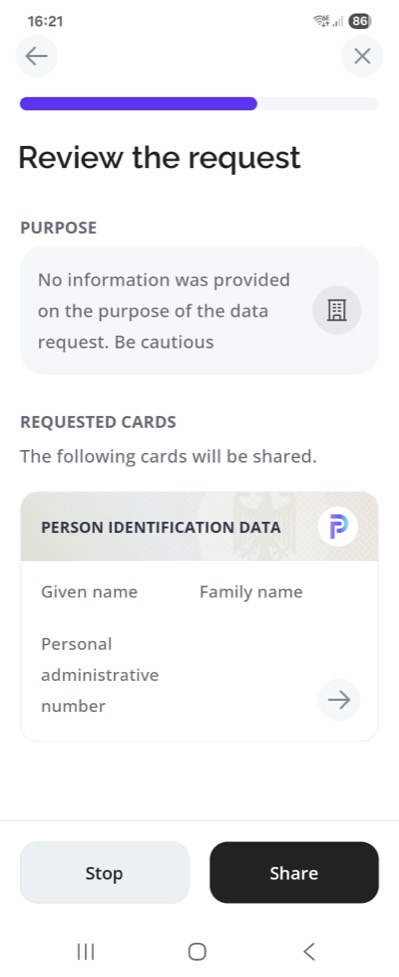
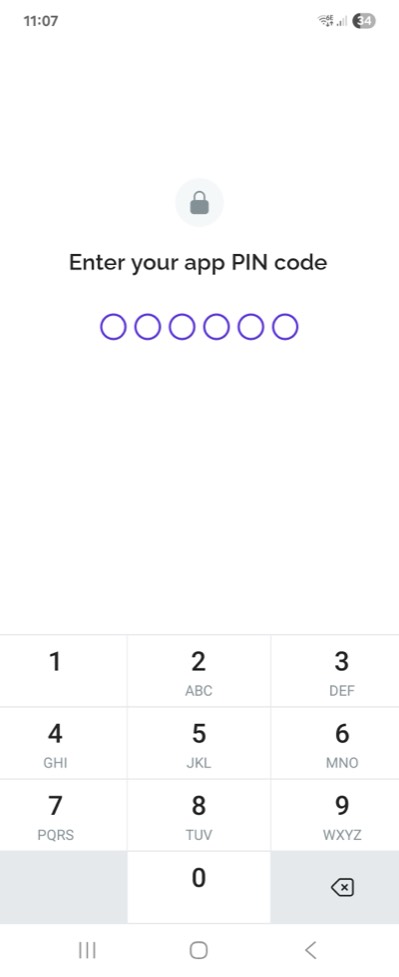
The whole flow in six screens, the computer at both ends and the phone in between: the page with the QR code, the warning about the unverified verifier, the request to review, the PIN code, the success screen, and the protected page back on the computer. The steps below detail what happens behind each one.
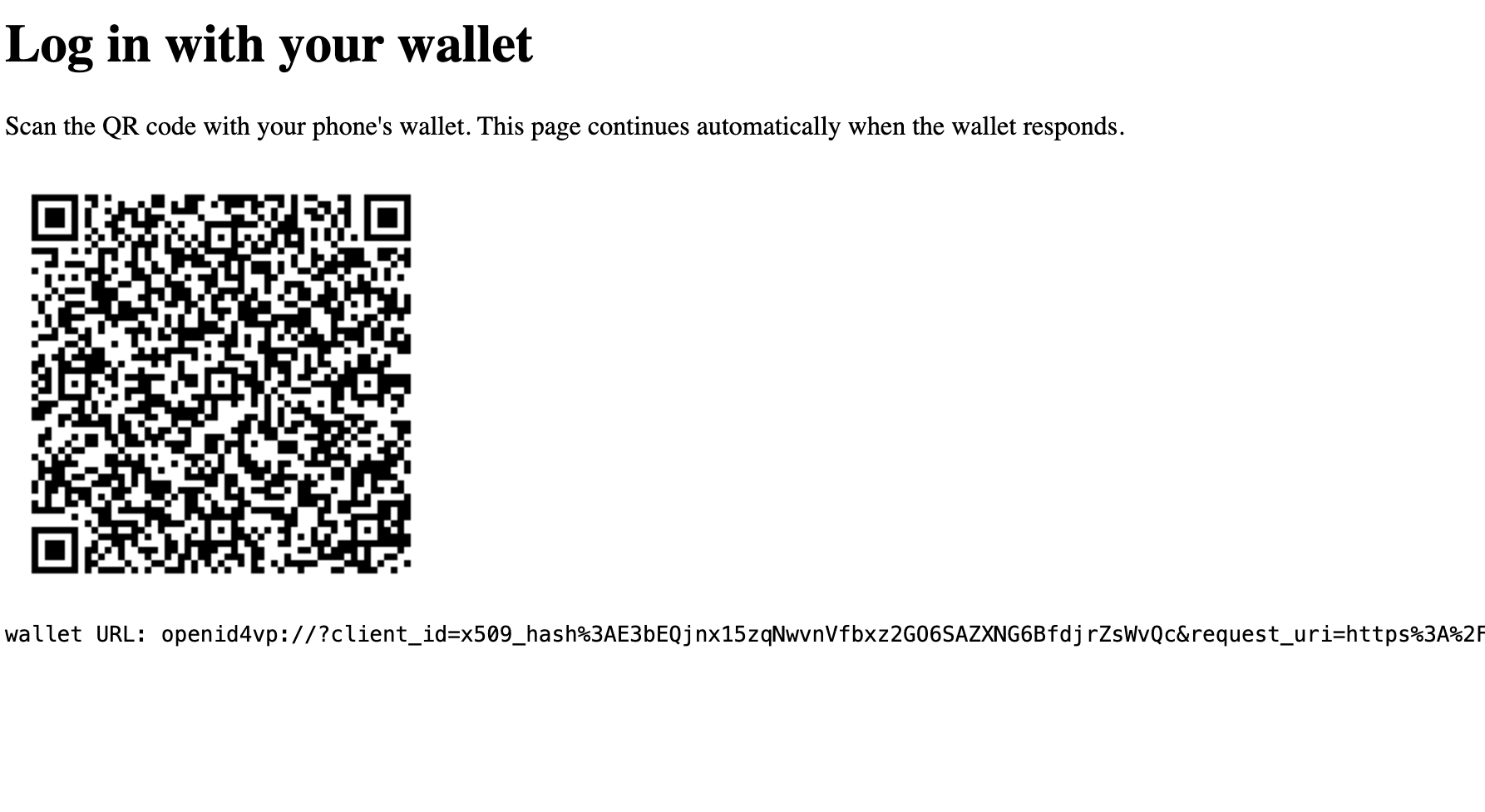
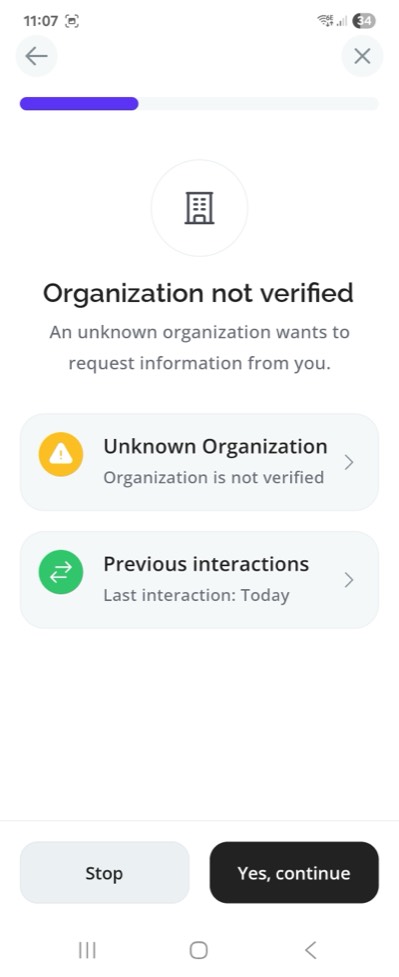
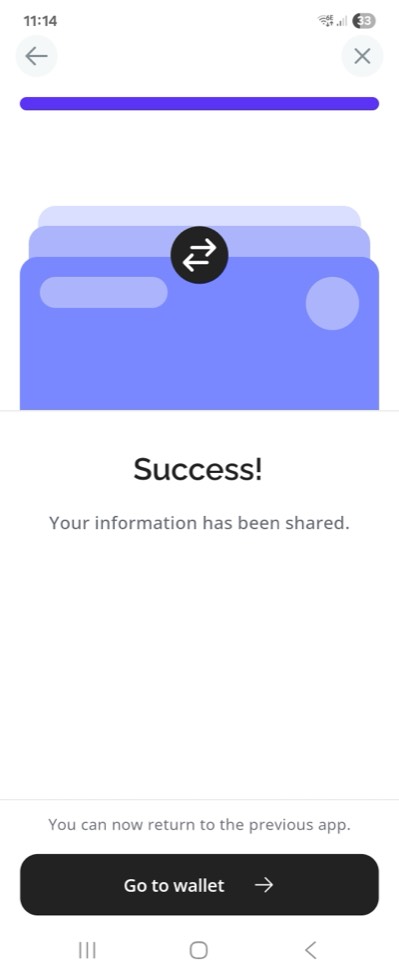
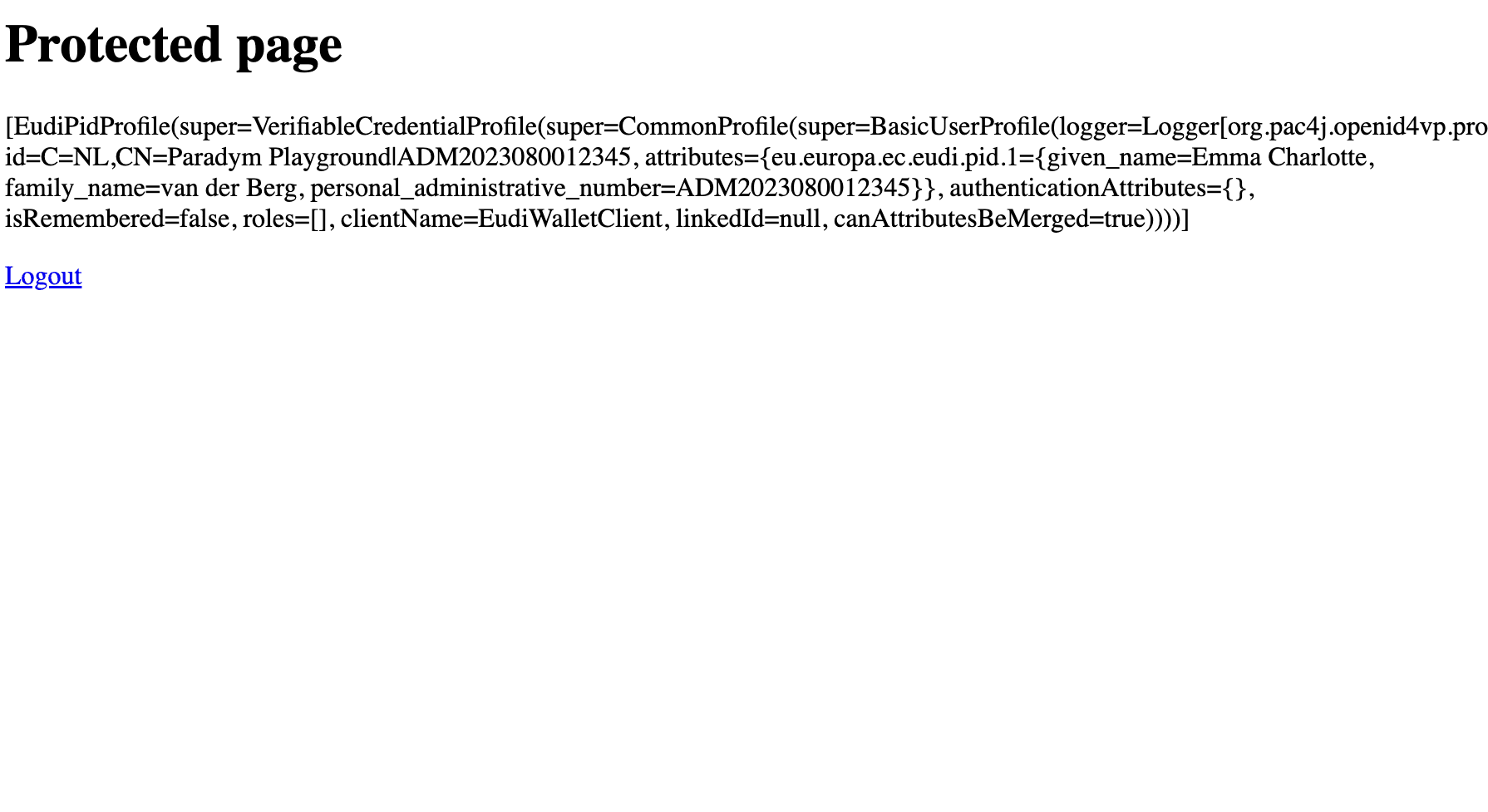
1. The page asks for the protected page, as data. pac4j finds no profile, creates a transaction and answers the openid4vp:// URL in the Location header of a 401. The page draws it as a QR code and starts polling the /status endpoint every second.
2. The phone scans the QR code. The Paradym wallet (opened and unlocked beforehand: the scan does not work from a cold start) reads the URL, which only carries the identifier of the verifier and a request_uri: it calls it, on the callback URL of your application, and receives the signed request object, with the DCQL query and the public key to encrypt its response.
3. The user consents. The wallet shows who is asking, the hash of your certificate for now, and what is asked: the PID, given name, family name and administrative number. The user picks the mdoc card and confirms with their PIN.
4. The wallet posts its response. An encrypted JWT, containing the mdoc device response, posted on the callback URL. pac4j decrypts, verifies and keeps the result for the browser session which started the transaction. The wallet shows that the sharing succeeded.
5. The page continues on its own. The next poll returns received: the page goes to the callback URL, pac4j retrieves the profile already validated when the wallet posted its response, stores it in the session and redirects to the page requested at step 1: the protected page shows Emma Charlotte van der Berg, with the three claims under the eu.europa.ec.eudi.pid.1 attribute and an identifier made of the issuer and the administrative number.
Nothing to do on the computer between the scan and the result: the whole exchange happened between the phone and the application.
12) What the logs say
The two loggers enabled in application.properties give two views of the flow. The PROTOCOL_MESSAGE.OPENID4VP logger prints the messages themselves, as they were sent or received, without any interpretation: one line per message, starting with >>> when the application sent it, <<< when it received it, followed by the other party, the browser or the wallet. The org.pac4j.openid4vp logger tells what pac4j did with them: the transaction created, the request object built, the response decrypted and verified, the profile built. Here is the flow above, shortened.
Step 1: a transaction is created, expiring five minutes later, and the wallet URL is handed to the page in a 401, since the request came as AJAX. Note the request_uri on the callback URL, and the identifier of the verifier, the hash of its certificate:
EudiWalletClient : applying EUDI wallet settings for client EudiWalletClient: X509_HASH, DIRECT_POST_JWT, PID profile definition
OpenId4VpConfiguration : OpenID4VP configuration checked: 1 credential queries, verifier formats=[SD_JWT_VC, MSO_MDOC], signed requests=true
VpTransaction : transaction c7e29a…: - -> CREATED (client EudiWalletClient, response mode direct_post.jwt, expires at 2026-10-12T14:26:08Z)
PROTOCOL_MESSAGE.OPENID4VP : [tx c7e29a…] >>> browser wallet URL: openid4vp://?client_id=x509_hash%3AE3bEQjnx15zqNwvnVfbxz2GO6SAZXNG6BfdjrZsWvQc&request_uri=https%3A%2F%2Fabcd-1234.ngrok-free.dev%2Fcallback%3Fclient_name%3DEudiWalletClient%26vp_tx%3Dc7e29a…&request_uri_method=post
EudiWalletClient : AJAX request detected -> returning UnauthorizedAction(super=HttpAction(code=401), content=) for https://abcd-1234.ngrok-free.dev/protected/index
The first two lines appear once, at the first request: the client initializes lazily. The configuration comes with a default verifier per format; section 8 replaced the mdoc one with the trusted issuers and the SD-JWT VC one stays, hence the two formats listed.
Step 2: the wallet fetches the request object, which is built for it and signed:
PROTOCOL_MESSAGE.OPENID4VP : [tx c7e29a…] <<< wallet GET client_name=EudiWalletClient&vp_tx=c7e29a…
OpenId4VpRequestObjectBuilder : client metadata built for transaction c7e29a…: formats=[dc+sd-jwt, mso_mdoc], response encryption methods=[A128GCM, A256GCM]
OpenId4VpRequestObjectBuilder : request object signed for transaction c7e29a… with ES256
VpTransaction : transaction c7e29a…: CREATED -> REQUEST_RETRIEVED (GET of the request URI)
PROTOCOL_MESSAGE.OPENID4VP : [tx c7e29a…] >>> wallet 200 eyJ4NWMiOlsiTUlJQmNq…
These demo traces show a GET even though the wallet URL advertises request_uri_method=post. pac4j accepts both methods; a wallet following the advertised method uses POST and can include its metadata and a wallet nonce.
The request object is a JWT whose header carries your certificate (x5c, with the rp alias as kid) and whose payload is the request. Decoded, its payload reads:
{
  "client_id": "x509_hash:E3bEQjnx15zqNwvnVfbxz2GO6SAZXNG6BfdjrZsWvQc",
  "response_type": "vp_token",
  "response_mode": "direct_post.jwt",
  "response_uri": "https://abcd-1234.ngrok-free.dev/callback?client_name=EudiWalletClient&vp_tx=c7e29a…",
  "nonce": "fb89b405c7ca40689912b460acd0e756",
  "state": "206a039fe14d4d1f9a3fa0c50f8ff207…",
  "dcql_query": { "credentials": [ { "id": "pid", "format": "mso_mdoc", "meta": { "doctype_value": "eu.europa.ec.eudi.pid.1" },
                  "claims": [ { "path": ["eu.europa.ec.eudi.pid.1", "given_name"] }, { "path": ["eu.europa.ec.eudi.pid.1", "family_name"] },
                              { "path": ["eu.europa.ec.eudi.pid.1", "personal_administrative_number"] } ] } ] },
  "client_metadata": { "jwks": { "keys": [ { "kty": "EC", "use": "enc", "crv": "P-256", "alg": "ECDH-ES", "kid": "3885759a…", "x": "…", "y": "…" } ] },
                       "encrypted_response_enc_values_supported": ["A128GCM", "A256GCM"],
                       "vp_formats_supported": { "dc+sd-jwt": { "sd-jwt_alg_values": ["ES256"], "kb-jwt_alg_values": ["ES256"] },
                                                 "mso_mdoc": { "issuerauth_alg_values": [-7], "deviceauth_alg_values": [-7] } } },
  "aud": "https://self-issued.me/v2", "iat": 1791814868, "exp": 1791815168
}
The device signature binds the mdoc to this request through a session transcript. Its OpenID4VP handover incorporates the response encryption key’s JWK thumbprint, the nonce, the verifier’s client_id and the response_uri. pac4j reconstructs this transcript when verifying the presentation, so a response bound to another request is rejected.
Step 4: the wallet posts its response, a JWE encrypted with the ephemeral key published in the request. pac4j decrypts it, verifies the mdoc and builds the profile; the claims come grouped by namespace:
PROTOCOL_MESSAGE.OPENID4VP : [tx c7e29a…] <<< wallet POST client_name=EudiWalletClient&vp_tx=c7e29a…&response=eyJraWQiOiIzODg1NzU5YS…
OpenId4VpAuthenticator : response decrypted and authentication tag verified for transaction c7e29a…: alg=ECDH-ES, enc=A128GCM, members=[vp_token, state]
CertificateTrustedIssuer : issuer truststore loaded: 1 trust anchors
CertificateTrustedIssuer : certificate revocation lists loaded: 0
MdocVerifier : mdoc verified for transaction c7e29a…
OpenId4VpAuthenticator : presentation 1/1 verified for transaction c7e29a…, query pid: format=MSO_MDOC, verifier=MdocVerifier
OpenId4VpAuthenticator : wallet response validated for transaction c7e29a…: 1 credential queries answered
EudiPidProfile : adding => key: eu.europa.ec.eudi.pid.1 / value: {given_name=Emma Charlotte, family_name=van der Berg, personal_administrative_number=ADM2023080012345} / class java.util.LinkedHashMap
OpenId4VpAuthenticator : profile built for transaction c7e29a…: profile class=EudiPidProfile, definition=EudiPidProfileDefinition
VpTransaction : transaction c7e29a…: REQUEST_RETRIEVED -> RESPONSE_RECEIVED (presentation validated)
PROTOCOL_MESSAGE.OPENID4VP : [tx c7e29a…] >>> wallet 200 {}
Unlike the SD-JWT VC of the first post, the document comes with the three requested elements and nothing else: an mdoc discloses element by element, and the issuer signs nothing outside the namespaces. The status checker of section 8 was not called either: the mdoc PID of the playground carries no status in its MSO.
Step 5: the page polled, saw received, and came back to the callback URL: the validated profile is picked up, nothing is verified twice, and the identifier is the one of the resolver, the subject of the document signer certificate and the administrative number:
VpTransaction : transaction c7e29a…: RESPONSE_RECEIVED -> CONSUMED (the browser came back)
OpenId4VpAuthenticator : transaction c7e29a…: reusing the profile validated when the wallet posted its response, nothing is verified again
EudiWalletClient : credentials: VerifiablePresentationCredentials(… verifiedCredentials={pid=[VerifiedCredential(format=MSO_MDOC, type=eu.europa.ec.eudi.pid.1, issuer=C=NL,CN=Paradym Playground, cryptographicHolderBinding=true, trustedAuthorities={aki=[IyNQbCkBG38NdbXBZT0C3rElbng]}, claims={eu.europa.ec.eudi.pid.1={given_name=Emma Charlotte, family_name=van der Berg, personal_administrative_number=ADM2023080012345}})]})
EudiWalletClient : profile: Optional[EudiPidProfile(id=C=NL,CN=Paradym Playground|ADM2023080012345, attributes={eu.europa.ec.eudi.pid.1={given_name=Emma Charlotte, family_name=van der Berg, personal_administrative_number=ADM2023080012345}}, …)]
The credentials line also shows what pac4j established about the document: its issuer, the holder binding, and the authority key identifier of the certificate chain, the one a trusted_authorities constraint of the DCQL query would be checked against.
Note that the logs show the credentials as they travel, tokens included: enable them to diagnose, not permanently in production.
13) Limitations and what comes next
A few things to know before going further:
- The profile identifier in this demo combines the document signer certificate’s subject,
C=NL,CN=Paradym Playgroundin these traces, with the administrative number. For persistent accounts, your PID provider must guarantee that the combination is stable, unique and never reassigned. Certificate subjects can change or be shared, and not every PID provider issues an administrative number. Choose an identifier policy appropriate to your trusted provider. - A refusal was silent with the tested Paradym wallet: when the user declined or had no matching card, nothing was posted, and the page waited until the transaction expired after five minutes. Wallets that post an error let pac4j report it at the callback.
- Certificate revocation is disabled in this demo. In production, keep it enabled and supply current CRLs or configure the Java PKIX provider to retrieve revocation data. This setting does not disable credential status checking: credentials carrying status information still need a status checker, and the one of this demo only logs the status reference, as seen in section 8.
- The device MAC of ISO 18013-5, transaction data, the
verifier_attestationandopenid_federationprefixes, and the automatic retrieval of status lists are not supported yet.
This integration is introduced in pac4j v6.6.0. The full documentation starts at OpenID for Verifiable Presentations, and the first post covers the same flow but on a single device, with an SD-JWT VC PID.