OpenID Federation with pac4j and Connect2id (1/2)
Since version 6.4.0, pac4j supports the OpenID (Connect) Federation specification.
The OpenID Connect (for short, OIDC) support in pac4j (pac4j-oidc module) is strongly based on the Nimbus libraries:
<dependency>
    <groupId>com.nimbusds</groupId>
    <artifactId>oauth2-oidc-sdk</artifactId>
</dependency>
<dependency>
    <groupId>com.nimbusds</groupId>
    <artifactId>nimbus-jose-jwt</artifactId>
</dependency>
These are great Open Source libraries developed by the Connect2id team:
- https://connect2id.com/products/nimbus-jose-jwt
- https://connect2id.com/products/nimbus-oauth-openid-connect-sdk
And as they also developed an OIDC server, let’s test the pac4j OpenID Federation support with it!
1) Components
In this article, we will focus on the setup of this particular configuration more than entering into the details and options of each component.
We need 3 components:
- a client, which is called the Relying Party (RP) in OIDC, and we will use pac4j
- a server, which is called the OpenID Provider (OP) in OIDC, and we will use the Connect2id server
- a trust anchor (TA for short) and we will create a simulated one to simplify the whole installation.
a) RP = pac4j
In the pac4j ecosystem, Spring Boot is the most popular web stack so let’s use the spring-webmvc-pac4j implementation in action in this simple demo: https://github.com/pac4j/simple-spring-boot-pac4j-demos/tree/oidc/src/main/java/org/pac4j/demos:
- the
SpringBootDemoclass runs the Spring Boot demo - the
SecurityConfigclass defines the security configuration (OIDC + URL protection) - the
Applicationclass is a simple controller with two URLs: one public and the other one protected.
We need the following dependencies:
<dependency>
    <groupId>org.springframework.boot</groupId>
    <artifactId>spring-boot-starter-web</artifactId>
</dependency>
<dependency>
    <groupId>org.pac4j</groupId>
    <artifactId>spring-webmvc-pac4j</artifactId>
    <version>8.0.2</version>
</dependency>
<dependency>
    <groupId>org.pac4j</groupId>
    <artifactId>pac4j-oidc</artifactId>
    <version>6.4.0</version>
</dependency>
b) OP = Connect2id
To make things easy, let’s use the “Quick start” of the Connect2id server: https://connect2id.com/products/server/docs/quick-start
Download the ZIP and unzip it. You will get a connect2id-server-19.8 directory or something similar.
In that directory, you can:
- run the server:
tomcat/bin/startup.sh - stop the server:
tomcat/bin/shutdown.sh - change its configuration in the
tomcat/webapps/c2id/WEB-INF/oidcProvider.propertiesfile - check the logs in the
tomcat/logs/c2id-server.logfile.
c) TA is simulated
The trust anchor is a core component in our installation: it plays the role of the certificate authority.
We could use some specific existing software, but to make things easier, we will simulate it without entering into the details.
2) Configuration
Now that we have our 3 components, let’s configure them to work together via the OpenID Federation protocol.
So far, when using the OpenID Connect protocol, you always need to define your client (client_id + credentials + redirect_uri) at the server level to be able to perform the authentication process.
The OpenID Federation introduces the idea of trust and chain of trust between components to allow authenticating without registering upfront/at all.
And each component (entry) in the federation exposes its metadata on the new .well-known/openid-federation endpoint. A dedicated JWKS ensures security, similar to an X.509 certificate but without its complexity/difficulty.
a) pac4j
As the Connect2id server runs by default on port 8080, we’ll move our pac4j application to port 8081 via this configuration in the application.properties file:
server.port=8081
app.base-url=http://localhost:8081
We update the SecurityConfig class to change the configuration for the federation:
package org.pac4j.demos;

import com.nimbusds.jose.JWSAlgorithm;
import com.nimbusds.oauth2.sdk.auth.ClientAuthenticationMethod;
import org.pac4j.core.config.Config;
import org.pac4j.oidc.client.OidcClient;
import org.pac4j.oidc.config.OidcConfiguration;
import org.pac4j.oidc.config.method.PrivateKeyJwtClientAuthnMethodConfig;
import org.pac4j.oidc.federation.config.OidcTrustAnchorProperties;
import org.pac4j.springframework.config.Pac4jSecurityConfig;
import org.springframework.beans.factory.annotation.Value;
import org.springframework.context.annotation.Bean;
import org.springframework.context.annotation.Configuration;
import org.springframework.web.servlet.config.annotation.InterceptorRegistry;

import java.util.List;

@Configuration
public class SecurityConfig extends Pac4jSecurityConfig {

    @Value("${app.base-url:http://localhost:8080}")
    private String baseUri;

    @Bean
    public Config config() {
        final var config = new OidcConfiguration();

        final var rpJwks = config.getRpJwks();
        rpJwks.setJwksPath("file:./metadata/rpjwks.jwks");
        rpJwks.setKid("defaultjwks0426");
        config.setClientAuthenticationMethod(ClientAuthenticationMethod.PRIVATE_KEY_JWT);
        final var privateKeyJwtConfig = new PrivateKeyJwtClientAuthnMethodConfig(rpJwks);
        config.setPrivateKeyJWTClientAuthnMethodConfig(privateKeyJwtConfig);

        config.setRequestObjectSigningAlgorithm(JWSAlgorithm.RS256);

        final var federation = config.getFederation();

        federation.setTargetOp("http://127.0.0.1:8080/c2id");
        final var trust = new OidcTrustAnchorProperties();
        trust.setIssuer("http://localhost:8081/trustanchor");
        trust.setJwksPath("classpath:trustanchor.jwks");
        federation.getTrustAnchors().add(trust);

        federation.getJwks().setJwksPath("file:./metadata/oidcfede.jwks");
        federation.getJwks().setKid("mykeyoidcfede26");
        federation.setContactName("C2ID Test RP (Localhost)");
        federation.setContactEmails(List.of("[email protected]"));

        federation.setEntityId("http://localhost:8081");

        return new Config(baseUri + "/callback", new OidcClient(config));
    }

    @Override
    public void addInterceptors(final InterceptorRegistry registry) {
        addSecurity(registry, "OidcClient").addPathPatterns("/protected/**");
    }
}
This new configuration needs explanations!
Notice that we don’t have any discoveryURI, nor any clientId or any credentials!
We need two distinct and separate JWKS for our setup here: one for the federation (to sign our entity statement) and one for the private_key_jwt client authentication (when calling the token endpoint). You should never use the same JWKS for both!
The source code:
final var rpJwks = config.getRpJwks();
rpJwks.setJwksPath("file:./metadata/rpjwks.jwks");
rpJwks.setKid("defaultjwks0426");
config.setClientAuthenticationMethod(ClientAuthenticationMethod.PRIVATE_KEY_JWT);
final var privateKeyJwtConfig = new PrivateKeyJwtClientAuthnMethodConfig(rpJwks);
config.setPrivateKeyJWTClientAuthnMethodConfig(privateKeyJwtConfig);
defines the JWKS used for the private_key_jwt client authentication. This will create a key named defaultjwks0426 and save it as a JWKS in the metadata/rpjwks.jwks file.
We use the Request Object signing configuration as the federation requires more security:
config.setRequestObjectSigningAlgorithm(JWSAlgorithm.RS256);
The JWKS used for signing here is the previous one defined in the rpJwks property.
In federation, you must define your trust anchor(s) (the root authority). So we do that with:
final var trust = new OidcTrustAnchorProperties();
trust.setIssuer("http://localhost:8081/trustanchor");
trust.setJwksPath("classpath:trustanchor.jwks");
federation.getTrustAnchors().add(trust);
It assumes the simulated TA is available at the http://localhost:8081/trustanchor URL with a JWKS also in the classpath (this is in the entity statement, but we rely on the one downloaded in the classpath).
The target OP (= the server we want to use for authentication) is of course the Connect2id and is defined by: federation.setTargetOp("http://127.0.0.1:8080/c2id").
Finally, the entity identifier of our RP pac4j client is http://localhost:8081 (its own base URL) thanks to federation.setEntityId("http://localhost:8081").
As we don’t have a clientId, the entityId is used to identify the RP.
It also means we must expose a dedicated OpenID federation endpoint (in the Application class):
@Autowired
private Config config;

...

@RequestMapping(value = "/.well-known/openid-federation",  produces = DefaultEntityConfigurationGenerator.CONTENT_TYPE)
@ResponseBody
public String oidcFederation() throws HttpAction {
    final var oidcClient = (OidcClient) config.getClients().findClient("OidcClient").get();
    return oidcClient.getConfiguration().getFederation().getEntityConfigurationGenerator().generateEntityStatement();
}
b) Connect2id
The Connect2id server is available on the http://127.0.0.1:8080/c2id URL.
To enable federation, in the tomcat/webapps/c2id/WEB-INF/oidcProvider.properties file, you need to change:
### Federation ###

# Enables / disables OpenID Federation 1.0. Disabled by default.
op.federation.enable=true

# The configured trust anchors. Leave blank if none.
op.federation.trustAnchors.1=http://localhost:8081/trustanchor

# Trust anchors or intermediate entities that may issue an entity statement
# about this OpenID provider. Leave blank if none.
op.federation.authorityHints.1=http://localhost:8081/trustanchor
op.federation.authorityHints.2=
op.federation.authorityHints.3=

# The enabled OpenID Federation 1.0 client registration types. The default
# value is none (for deployments that use manual client registration only).
#
# Supported OpenID Federation 1.0 client registration types:
#
#     * explicit
#     * automatic
#
op.federation.clientRegistrationTypes=automatic

# The enabled methods for authenticating OpenID Federation 1.0 automatic client
# registration requests at the OAuth 2.0 authorisation endpoint.
#
# Supported methods:
#
#     * request_object
#
op.federation.autoClientAuthMethods.ar=request_object
The parameters are quite obvious: op.federation.enable=true to enable the federation.
The trust anchor is defined twice:
op.federation.trustAnchors.1=http://localhost:8081/trustanchor
op.federation.authorityHints.1=http://localhost:8081/trustanchor
And we use the automatic registration mode (the simplest way): op.federation.clientRegistrationTypes=automatic.
Stop and restart the Connect2id server. You should see this welcome page on http://127.0.0.1:8080/c2id:
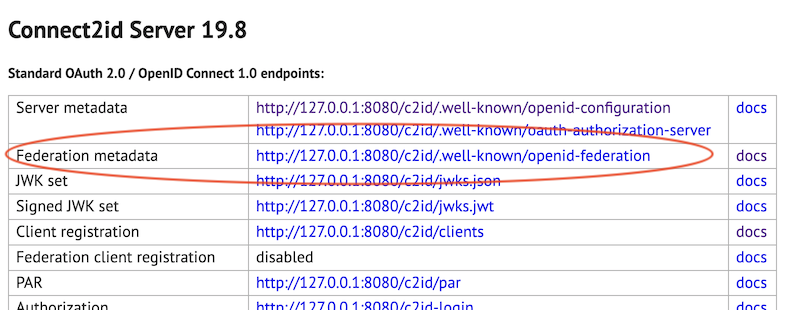
Meaning the federation is properly enabled.
c) Simulated TA
For the simulated trust anchor, let’s not enter into the details to limit the size of this article.
We expose a few endpoints to simulate its behavior and the contract it must respect (in the Application class):
@GetMapping(value = "/trustanchor/.well-known/openid-federation", produces = DefaultEntityConfigurationGenerator.CONTENT_TYPE)
@ResponseBody
public String trustAnchorWellKnown() throws Exception {
    return "eyJraWQiOiJ0YS1rZX...vBabK4L897BynKoyihoUHj4Q";
}

@GetMapping(value = "/trustanchor/fetch", produces = DefaultEntityConfigurationGenerator.CONTENT_TYPE)
@ResponseBody
public String trustAnchorFetch(final HttpServletRequest request) throws Exception {
    final var sub = request.getParameter("sub");
    if (sub.contains("127.0.0.1")) { // OP
        return "eyJraWQiOiJ0YS1rZX...ldEVZd49QyZRnENUCP4hOMCWiQ";
    } else { // RP
        return "eyJraWQiOiJ0YS1rZX...n94DBmi3m158dbEO2ZWyM_9YdWtxjerAl1Zh-bgzA6H17tRGlk-oYd-7g";
    }
}
And add the trustanchor.jwks to the src/main/resources directory.
3) Let’s log in
Now we run our pac4j Spring Boot RP and our Connect2id OP server.
Let’s add more logs on the pac4j side via: logging.level.org.pac4j.oidc=DEBUG (in the application.properties file).
Open the http://localhost:8081/ URL in your browser and click on the Protected area link:
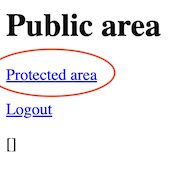
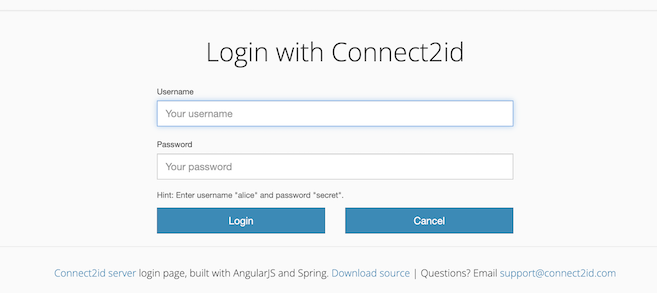
Ta-da! It works: the Connect2id login page is displayed and we can log in with the default alice/ secret user/password:
The pac4j logs:
DEBUG o.p.o.m.OidcFederationOpMetadataResolver : Blocking load of the provider metadata via federation
 INFO o.p.o.m.chain.FederationChainResolver    : Resolving federation chain for RP: http://localhost:8081
DEBUG o.p.o.m.chain.FederationChainResolver    : Loaded 1 trust anchor(s)
DEBUG o.p.o.m.chain.FederationChainResolver    : OP target issuer: http://127.0.0.1:8080/c2id
DEBUG o.p.o.m.chain.FederationChainResolver    : OP chain: com.nimbusds.openid.connect.sdk.federation.trust.TrustChain@14c16574
DEBUG o.p.o.m.chain.FederationChainResolver    : rawMetadataJson: {"request_parameter_supported":true,"pushed_authorization_...
DEBUG o.p.o.m.chain.FederationChainResolver    : combinedPolicy: {}
DEBUG o.p.o.m.chain.FederationChainResolver    : resolvedJson: {"request_parameter_supported":true,"pushed_authorization_...
DEBUG o.p.o.m.r.FederationClientRegister       : ClientID is not defined
DEBUG o.p.o.m.r.FederationClientRegister       : Automatic registration by OP (supported by RP) ->
setting clientId as entityId for further operation
DEBUG o.p.o.r.OidcRedirectionActionBuilder     : Algorithm used for request object signing: RS256
DEBUG o.p.o.r.OidcRedirectionActionBuilder     : Request Object claim names: [iss, aud, iat, exp, jti, scope,
response_type, redirect_uri, state, code_challenge_method, client_id, code_challenge, response_mode]
DEBUG o.p.o.r.OidcRedirectionActionBuilder     : Authz parameter names: [response_type, request, client_id, scope]
DEBUG o.p.o.r.OidcRedirectionActionBuilder     : Authentication request URL: http://127.0.0.1:8080/c2id-login?response_type=code
&request=eyJraW...KLjkrVw&client_id=http%3A%2F%2Flocalhost%3A8081&scope=openid%20profile%20email
 INFO .f.e.DefaultEntityConfigurationGenerator : Generating entity configuration for: http://localhost:8081
The Connect2id logs:
INFO FED-REG - [OP8025] Resolved 1 trust chains (automatic client):
INFO FED-REG - [OP8026] Trust chain [1] anchor (automatic client): http://localhost:8081/trustanchor
INFO FED-REG - [OP8026] Trust chain [1][1] entity (automatic client): http://localhost:8081
INFO FED-REG - [OP8026] Trust chain [1][1] statement (automatic client): {"sub":"http:\/\/localhost:8081","metadata":{"openid_relying_party":...
INFO FED-REG - [OP8026] Trust chain [1][2] entity (automatic client): http://localhost:8081
INFO FED-REG - [OP8026] Trust chain [1][2] statement (automatic client): {"sub":"http:\/\/localhost:8081","metadata":{"openid_relying_party":...
INFO FED-REG - [OP8013] Selected trust chain for entity http://localhost:8081 (automatic client) with anchor
http://localhost:8081/trustanchor and exp 2026-06-25T20:52:26.000+0200
INFO FED-REG - [OP8018] Received automatic registration request from http://localhost:8081 with authorities [http://localhost:8081/trustanchor]
INFO FED-REG - [OP8051] Effective metadata RP policy for entity http://localhost:8081: {}
INFO FED-REG - [OP8014] Registered entity http://localhost:8081 as automatic client with client_id=http://localhost:8081 exp=1782413546
INFO AUTHZ-SESSION - [OP2101] Created new auth session: sid=0r61vms5vYcodERRslQNMT0QqFRQsjw2Jr33YL4de5s client_id=http://localhost:8081 scope=...
Without going too deep in the logs, we can see that both sides are checking federation endpoints and entity statements to establish the trust chain.
So here is the magic of federation:
But nonetheless the RP can perform the authentication process on the OP!